
WATCH CONSOLE / SINGLE SERVER
Know what your Docker server is doing before it runs out of room.
For self-hosters running too many containers on one VPS.
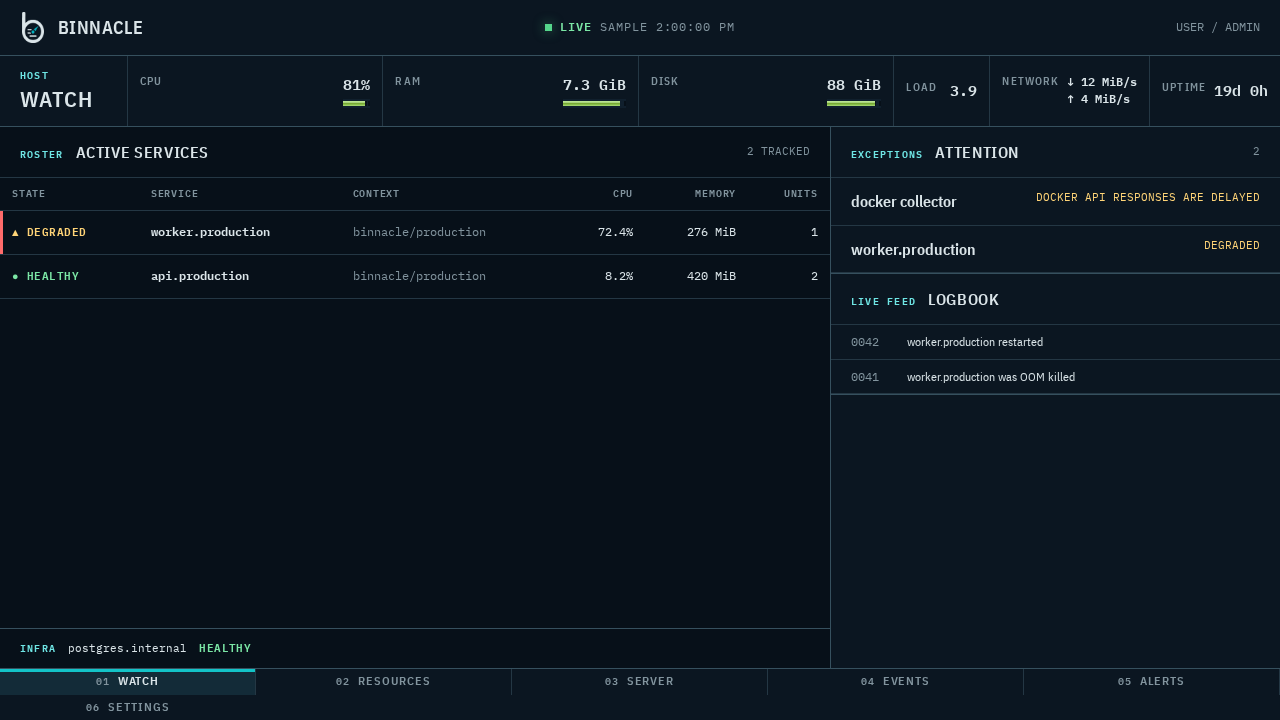
Binnacle shows host pressure, container usage, Coolify and Compose services, checks, incidents, alerts, notifications, effective health, events, and local history in one lightweight, read-only dashboard — without Prometheus, Grafana, or external telemetry.
Current release: v0.6.0 is available for amd64 and arm64 from GHCR with an immutable version tag.
- AGPLv3
- Read-only by design
- Local SQLite
- No external telemetry
- Single-server first
- Go + Svelte
- Docker / Coolify
THE OPERATING PROBLEM
One VPS. Too many containers. Not enough visibility.
Coolify makes it easy to deploy apps. Binnacle helps you understand what those apps are doing to your server over time: memory pressure, CPU spikes, disk growth, restarts, OOMs, and noisy services.
OPERATING PRINCIPLES
Designed to observe, not operate.
-
01.1
Local-first
Metrics stay on your server in SQLite. No cloud account. No external telemetry.
-
01.2
Low overhead
Designed as a small single service for VPSs, not a full observability stack.
-
01.3
Coolify-aware
Uses Coolify and Compose metadata to present logical services instead of transient container IDs.
-
01.4
Read-only by design
Observes Docker without stop, restart, delete, exec, shell, or redeploy controls.
-
01.5
Live state
Streams current host and container state to the dashboard as samples are collected.
-
01.6
Useful history
Keeps local metric and event history so you can see what changed, not just what is happening now.
RESOURCE MODEL
Coolify-aware, not Coolify-only.
Binnacle works with plain Docker and Docker Compose. On Coolify hosts, it uses available Docker labels and metadata to keep logical resources recognizable across container replacement.
Docker monitoring comes first. Coolify awareness improves the names and grouping without making the dashboard depend on the Coolify API.
- coolify.resource.uuid
- personal-site
- compose.project
- personal-site
- compose.service
- web
- containers
- web-1, web-2
- logical resource
- web / 2 units
TOOL SELECTION
Not another observability stack.
Binnacle is not trying to replace Prometheus, Grafana, or a centralized multi-node metrics platform. It is for single Docker servers and Coolify VPSs that need clear local visibility with minimal operational overhead.
Use Binnacle when
- You run many containers on one VPS.
- You want local history without a monitoring stack.
- Read-only workload safety is a requirement.
- You want logical services instead of raw container noise.
- You want one focused Docker monitoring service.
Use Prometheus / Grafana when
- You need multi-server aggregation.
- You need long-term centralized observability.
- You need complex queries and alert routing.
- You already operate a metrics stack.
- You need broad integrations and custom dashboards.
- Glances
- Broad machine, process, and container inspection.
- Uptime Kuma
- Endpoint availability checks, status pages, and notifications.
- Coolify
- Deployment control with built-in resource and status monitoring.
- Binnacle
- Read-only Docker pressure, service context, events, and local history.
PROJECT STATUS / TRANSPARENT BY DEFAULT
Current release.
v0.6.0 passed release qualification and is published with a multi-architecture container image and build provenance.
Advanced authentication and portability remain disabled by default pending acceptance. Multi-server monitoring remains later scope; workload controls remain excluded.
DEPLOYMENT SEQUENCE
Deploy v0.6.0.
Linux on amd64 or arm64 · Docker Engine 29.5.1+ · read access to
host
/proc, /sys, and Docker · one persistent
data volume
-
01
Docker Compose first-run token
export BINNACLE_SETUP_TOKEN="$(openssl rand -hex 32)" -
02
PRIMARY PATH Coolify
Deploy the included service template, copy the generated setup token, attach a domain, and complete local onboarding.
PORTABLE PATH Docker Compose
Use the canonical Compose definition with host telemetry mounts, the Docker socket, and a persistent SQLite volume.
-
03
Follow the release-aware guide
Use the immutable
Open install guidev0.6.0image tag in production. The guide covers Coolify, Docker Compose, secrets, upgrades, and the restricted Docker socket boundary.
FIELD REFERENCE